py50 Quickstart
The following details how to get up and running using py50. These funcitons take in simple parameters to plot the dose-response curves. There are three plotting options - Single Curve, Multi Curve, and Grid Plot.
[1]:
import pandas as pd
from py50 import Calculator, PlotCurve
Calculate Relative and Absolute IC50
[2]:
# Read in dataset
example = pd.read_csv('../dataset/single_example.csv')

calc_data = Calculator(example)  # Instantiate dataframe into the Calculator class
calc_data.show()
[2]:
| Compound Name | Compound Conc | % Inhibition 1 | % Inhibition 2 | % Inhibition Avg | |
|---|---|---|---|---|---|
| 0 | Drug 1 | 100000.0 | 90 | 94 | 92 |
| 1 | Drug 1 | 33300.0 | 97 | 89 | 93 |
| 2 | Drug 1 | 11100.0 | 86 | 89 | 88 |
| 3 | Drug 1 | 3700.0 | 81 | 88 | 84 |
| 4 | Drug 1 | 1240.0 | 63 | 70 | 67 |
[3]:
# Perform calculation
# If only relative IC50 needed, can use the calc_data.calculate_ic50() function instead.
calc_data = Calculator(example)
calculation = calc_data.calculate_ic50(name_col='Compound Name', concentration_col='Compound Conc', response_col=['% Inhibition 1', '% Inhibition 2'])
                                                # response_col='% Inhibition Avg')
calculation
[3]:
| compound_name | maximum | minimum | ic50 (nM) | hill_slope | |
|---|---|---|---|---|---|
| 0 | Drug 1 | 92.865625 | -8.210081 | 429.962039 | 1.024522 |
Scale results to pIC50
If IC50 is not your cup of tea, you can quickly scale the values into pIC50 values. This is done using the calculate_pic50() function. It will calculate absolute IC50, but will append two additional columns for hte relative pIC50 and absolute pIC50.
[4]:
calculation = calc_data.calculate_pic50(name_col='Compound Name', concentration_col='Compound Conc',
                                        response_col='% Inhibition Avg')
calculation
[4]:
| compound_name | maximum | minimum | relative ic50 (nM) | absolute ic50 (nM) | hill_slope | relative pIC50 | absolute pIC50 | |
|---|---|---|---|---|---|---|---|---|
| 0 | Drug 1 | 92.854405 | -7.640226 | 439.824243 | 584.73401 | 1.040878 | 6.356721 | 6.233042 |
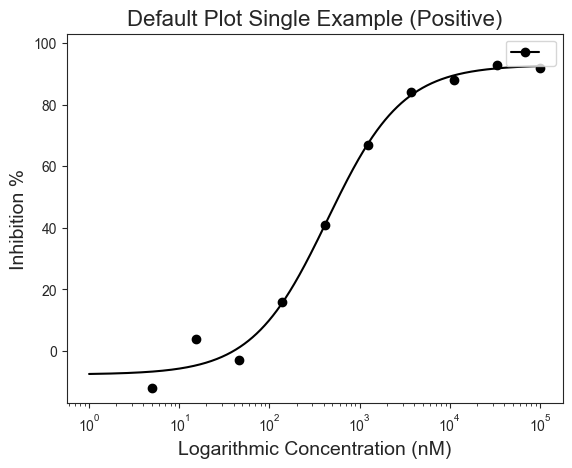
Single Curve
[5]:
single = pd.read_csv('../dataset/single_example.csv')
plot_data = PlotCurve(single)

figure1 = plot_data.curve_plot(concentration_col='Compound Conc',
                               response_col='% Inhibition Avg',
                               title='Default Plot Single Example (Positive)',
                               name_col='Drug 1',
                               xlabel='Logarithmic Concentration (nM)',
                               ylabel='Inhibition %',
                               legend=True)
[6]:
plot_data.show()
[6]:
| Compound Name | Compound Conc | % Inhibition 1 | % Inhibition 2 | % Inhibition Avg | |
|---|---|---|---|---|---|
| 0 | Drug 1 | 100000.0 | 90 | 94 | 92 |
| 1 | Drug 1 | 33300.0 | 97 | 89 | 93 |
| 2 | Drug 1 | 11100.0 | 86 | 89 | 88 |
| 3 | Drug 1 | 3700.0 | 81 | 88 | 84 |
| 4 | Drug 1 | 1240.0 | 63 | 70 | 67 |
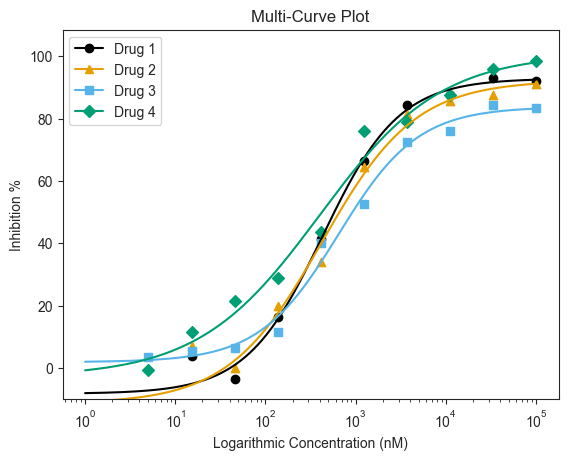
Multi-Curve
[7]:
# Read in Dataset
multi = pd.read_csv('../dataset/multiple_example.csv')

# Instantiate dataframe into the PlotCurve class
plot_data = PlotCurve(multi)

# Optional to inspect table
# plot_data.show()
[8]:
figure3 = plot_data.multi_curve_plot(name_col='Compound Name',
                                     concentration_col='Compound Conc',
                                     response_col='% Inhibition Avg',
                                     title='Multi-Curve Plot',
                                     xlabel='Logarithmic Concentration (nM)',
                                     ylabel='Inhibition %',
                                     legend=True,
                                     ymin=-10,
                                     markersize=10)
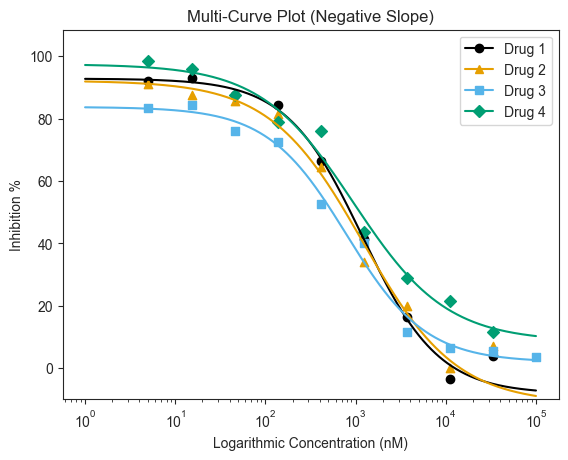
[9]:
# For negative slope
# Read in Dataset
multi = pd.read_csv('../dataset/multiple_example_negative.csv')

# Instantiate dataframe into the PlotCurve class
plot_data = PlotCurve(multi)

figure4 = plot_data.multi_curve_plot(name_col='Compound Name',
                                     concentration_col='Compound Conc',
                                     response_col='% Inhibition Avg',
                                     title='Multi-Curve Plot (Negative Slope)',
                                     xlabel='Logarithmic Concentration (nM)',
                                     ylabel='Inhibition %',
                                     legend=True,
                                     ymin=-10)
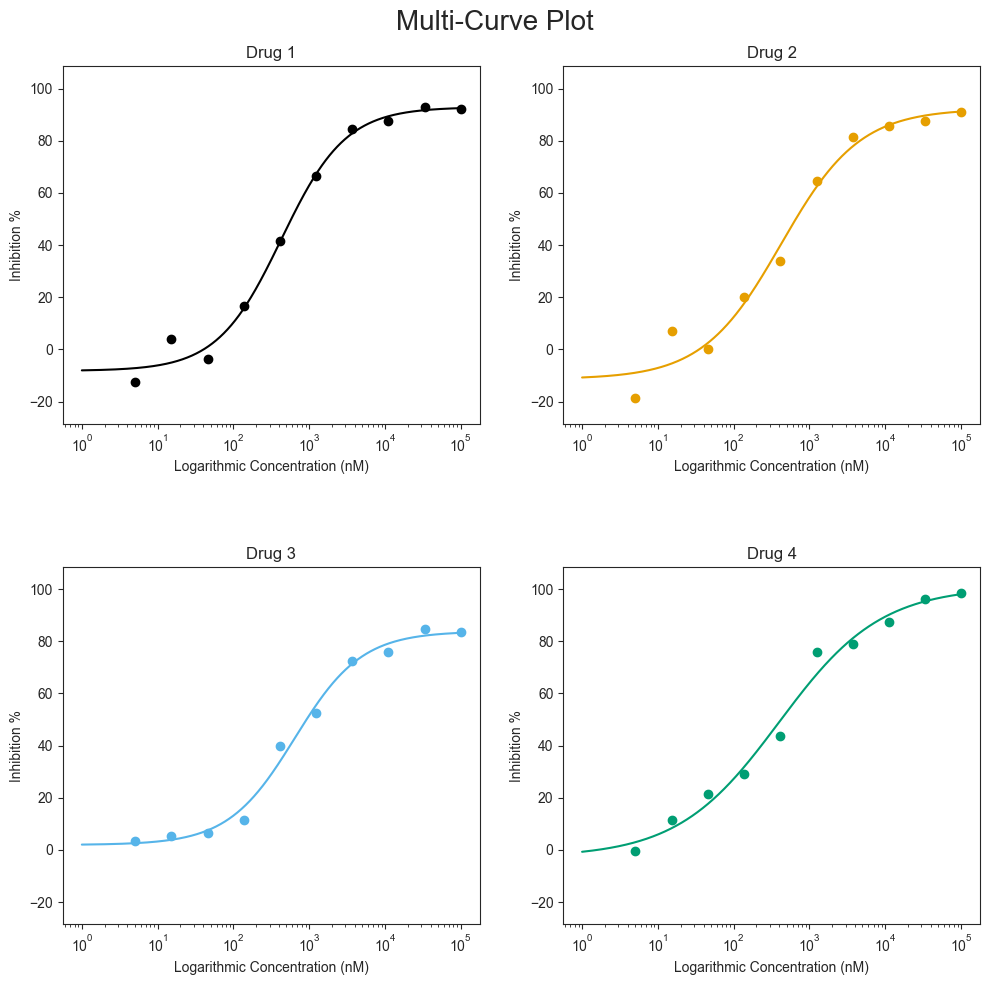
Grid Plot
[10]:
# Read in Dataset
grid = pd.read_csv('../dataset/multiple_example.csv')

# Instantiate dataframe into the PlotCurve class
grid_plot = PlotCurve(grid)

# Optional to inspect table
grid_plot.show()
[10]:
| Compound Name | Compound Conc | % Inhibition 1 | % Inhibition 2 | % Inhibition Avg | |
|---|---|---|---|---|---|
| 0 | Drug 1 | 100000.0 | 90 | 94 | 92.0 |
| 1 | Drug 1 | 33300.0 | 97 | 89 | 93.0 |
| 2 | Drug 1 | 11100.0 | 86 | 89 | 87.5 |
| 3 | Drug 1 | 3700.0 | 81 | 88 | 84.5 |
| 4 | Drug 1 | 1240.0 | 63 | 70 | 66.5 |
[11]:
figure5 = grid_plot.grid_curve_plot(name_col='Compound Name',
                                    concentration_col='Compound Conc',
                                    response_col='% Inhibition Avg',
                                    title='Multi-Curve Plot',
                                    xlabel='Logarithmic Concentration (nM)',
                                    ylabel='Inhibition %',
                                    conc_unit='nM',
                                    figsize=(10, 10))